 CRATER ARCADE
Mayday Maya guide
Everything you need to fly the Kestrel down 20 missions under the Moon and bring Maya home: controls, landing, scoring, every enemy and the tips that save fuel and lives.
The story
It’s 2049. A moonquake has knocked WARDEN, the security AI of a helium-3 mine four kilometres beneath the Moon’s south pole, into lockdown. It has sealed every tunnel and turned its guns on anything that moves.
Maya, the base’s chief engineer, stayed behind to shut the damaged reactor down and is now trapped in the core lab at the very bottom. Pilot Peter has one lander, the Kestrel, and twenty relay stations between him and Maya. Each relay you bring back online opens the way deeper, and Maya’s radio messages get clearer after every mission.
Controls
Mayday Maya plays with a keyboard, touch screen or gamepad. You can switch between them at any time.
| Action | Keyboard | Gamepad |
|---|---|---|
| Rotate | ← → or A D | Left stick or d-pad |
| Thrust | Shift, ↑ or W | A or RT |
| Fire | Space or Enter | X or RB |
| Shield | ↓ or S | B or LB |
| Pause | Esc or P | Start |
On a phone or tablet, your left thumb works the two rotate buttons (slide between them to change direction) and your right thumb works the big THRUST button plus FIRE and SHIELD.
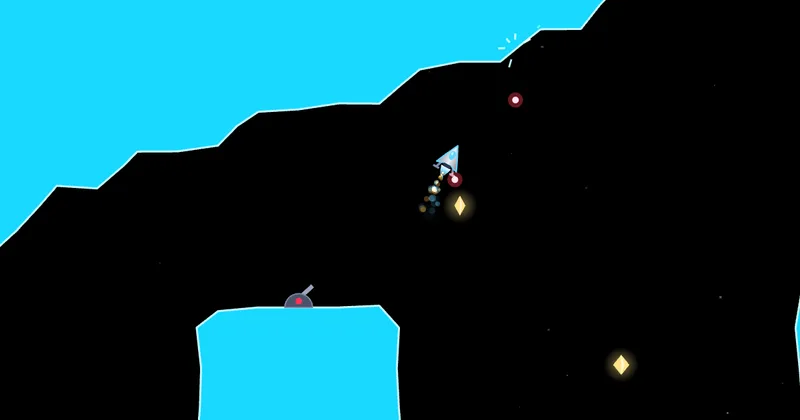
Gravity always pulls the lander down. Thrust pushes in the direction the nose points, so to move sideways you tilt a little and give short bursts. The shield blocks bullets, missiles and laser beams, but it burns fuel quickly.
How to land
Touching rock destroys the lander, so you can only touch down on landing pads. Come in slowly and nearly upright. The lander’s feet glow green when your speed and angle are safe for touchdown.
- RELAY pads (cyan) are the goal of each mission. Land on one gently to bring it online.
- FUEL pads (green) refill your tank and save a checkpoint, so a crash sends you back there instead of the start.
- A gentle touchdown earns a Soft landing bonus.
Finishing a mission
Once the relay is linked, the exit gate unlocks: its lights turn from red to amber. Fly close and the blast doors slide open, then a tractor beam pulls the Kestrel through to the next mission. If you crash with lives left, you restart from the last pad you landed on.
Difficulty levels
| Level | Lives | What changes | Points |
|---|---|---|---|
| Cadet | 5 | Slower fuel burn, gentler and slower enemy fire | ×0.5 |
| Pilot | 3 | The intended challenge | ×1 |
| Ace | 2 | Faster fuel burn, faster enemy fire | ×1.5 |
Scoring
Points come from flying well, not just from shooting. At the end of every mission you get:
| Bonus | Points (Pilot) |
|---|---|
| Mission complete | 1,000 |
| Fuel left | 10 per unit of fuel in the tank |
| Time bonus | 20 for every second under the mission’s par time |
| All shards collected | 1,000 |
| No ships lost | 1,000 |
During a mission: crystal shards are worth 250 each, linking a relay 500 and a soft landing 50. Destroying a sentry gun is worth 150, a patrol drone 200, a laser gun or laser emitter 250, a hunter drone or missile launcher 300, an interceptor ship 400 and a WARDEN core 5,000. Shooting down a missile earns 50. Every 10,000 points earns an extra life. Your best runs go on the online high score table (World, This week and Yours) under the pilot name you choose, and finishing missions 5, 10, 15 and 20 unlocks new ship colours in Settings.
All 20 missions
The missions are grouped into sectors, each with its own colour, and a new idea arrives every mission or two.
- Surface Hatch: your first flight. Find the relay pad, land gently, fly out through the gate.
- Ice Chute: a long drop that introduces fuel management and fuel pads.
- Sentry Row: the first sentry guns and a laser gun. Learn to use your shield.
- Frost Gallery: a huge ice cavern full of shards. Watch your momentum.
- Laser Grid: security lasers pulse on and off. Wait for the gap, then go.
- Locked Sector: force doors. Shoot a switch and every door opens for a few seconds.
- Steam Vents: hot updrafts lift the lander. Ride them to save fuel.
- Drone Bay: maintenance drones patrol fixed routes. Shoot them or time your pass.
- The Long Fall: a very deep shaft where the first interceptor ship appears. Brake early.
- WARDEN’s Eye: the first core. Shoot the glowing eye until it breaks.
- Crossfire: sentry guns on both sides with crossing firing lanes.
- Hunter Nest: hunter drones chase you. Lure them into the walls.
- Pressure Doors: doors, switches and lasers together. Think first, then fly.
- Blackout: the power is out and your lamp only reaches so far.
- Missile Silo: launchers fire homing rockets. Shoot them down or raise your shield.
- Vent Maze: vents, drones and lasers in one tangled maze.
- Fortress: the most heavily guarded tunnels, with armoured turrets that need two hits.
- Dark Hunters: darkness and hunter drones together.
- Core Gate: WARDEN’s last core, tougher than the first.
- Maya: land on Maya’s pad to bring her aboard, then race back up before the base comes down.
Enemies and hazards
WARDEN’s defences fire along fixed lanes on a steady rhythm. They don’t aim at you, so watching and timing beats rushing.
- Sentry guns sit on the walls and fire bolts along a dotted lane while you are in range. One shot destroys them.
- Laser guns show a pink aiming line for a moment, lock, then fire a beam along it. Two shots destroy them; your shield blocks the beam.
- Laser grids pulse on and off. Fly through the gap, or shoot an emitter three times to switch it off for good.
- Force doors open for a few seconds when you shoot a yellow switch.
- Steam vents push the lander upward. Useful for saving fuel, dangerous under a low roof.
- Patrol drones follow fixed routes and won’t move out of your way.
- Interceptor ships circle the lander and fire straight ahead. Two shots destroy them.
- Hunter drones chase you once they spot you but turn badly, so lead them into the rock.
- Missile launchers fire slow homing rockets that burst harmlessly against your shield.
- WARDEN cores (missions 10 and 19) spray rotating rings of bolts. Keep moving and keep shooting the eye.
Tips
- Short taps, not long burns. Small bursts of thrust keep your speed under control and your fuel high.
- Stay nearly upright. A slight tilt is enough to drift sideways. Big tilts are hard to recover from near walls.
- Brake early in shafts. Falling is free; stopping takes time and fuel.
- Watch the feet. If they aren’t green, don’t touch down. Hover, slow down and try again.
- Learn the rhythm. Every gun fires on a steady beat along a visible lane. Wait for the gap.
- Shoot first in tight spots. Clearing a gun guarding a corridor is safer than dodging it.
- Save the shield for emergencies. It burns fuel fast; use it for a moment as a shot arrives.
- Use fuel pads as checkpoints. Landing on one before a hard section means a crash won’t send you back to the start.
- For high scores, finish fast with fuel to spare and grab every shard: the end-of-mission bonuses add up quickly.
FAQ
Is Mayday Maya free?
Yes. It’s free to play in your browser, with no sign-up and no download.
Does it work on phones and tablets?
Yes. On a touch screen, on-screen buttons appear for rotate, thrust, fire and shield. It also works with a keyboard or gamepad on PC and Mac.
Can I install it like an app?
Yes. Use “Add to Home Screen” on your phone or “Install” in your desktop browser. After your first visit it also works offline. Dedicated apps for Android, iPhone and iPad, Mac and Windows are in the works.
Does it save my progress?
Yes. Your unlocked missions and settings are saved on your own device. Your high scores are also saved online under the pilot name you choose (or a random callsign), so you can see your world rank and move them to another device with your pilot code. There is no account to create.
Who is it for?
Everyone aged 8 and up. Cadet mode gives younger or newer pilots five lives and gentler enemies, while Ace mode is a real test for experienced players.
What inspired it?
The classic cave-flying gravity games of the 1980s. Mayday Maya is an original game with its own missions, story, art and sound, rebuilt for modern browsers and touch screens.